Are you planning to run Cat 6 cables through a conduit but wondering how many you can fit inside? Getting this right is crucial for a clean, efficient setup that avoids signal loss and overheating.
If you squeeze too many cables into one conduit, you risk damaging your network’s performance. But how do you find the perfect balance? You’ll discover the key factors that determine how many Cat 6 cables can safely fit in a single conduit.
By the end, you’ll have the clear answers you need to plan your wiring like a pro. Keep reading to make sure your network runs smoothly and stays future-proof.
Cat 6 Cable Basics
Understanding Cat 6 cable basics helps in choosing the right cable for your network. Cat 6 cables support faster data transfer and better performance than older cables. These cables are common in homes and offices. Knowing their structure and uses is important before planning how many cables fit in one conduit.
Cable Structure And Dimensions
Cat 6 cables have eight wires twisted into four pairs. Twisting reduces interference and improves signal quality. The cable diameter is usually about 6 mm. Some Cat 6 cables have extra shielding for better protection. This adds a bit to the diameter. Cable size affects how many can fit inside a conduit. Thicker cables mean fewer cables fit.
Common Uses In Networking
Cat 6 cables connect computers, routers, and switches in networks. They support speeds up to 1 Gbps for most setups. Cat 6 can also handle 10 Gbps at short distances. Offices use Cat 6 for fast and reliable internet. Homes use it for streaming and online gaming. Proper cable choice ensures smooth data flow and fewer connection problems.
Conduit Types And Sizes
Choosing the right conduit and size is important for Cat 6 cable installation. Different conduits hold different numbers of cables. The type and size affect cable protection and ease of pulling wires. Knowing these details helps plan a neat, safe setup.
Materials And Dimensions
Conduits come in materials like PVC, metal, and flexible plastic. PVC is common and easy to work with. Metal conduits protect cables better from damage and interference. Flexible conduits fit tight spaces well.
Sizes vary from small 1/2 inch to large 2 inch or more. The inner diameter decides how many Cat 6 cables fit inside. Larger conduits hold more cables but cost more and take space.
Choosing The Right Conduit
Pick a conduit size that fits the number of cables and room to pull them. Too many cables in a small conduit cause damage and signal loss. Leave space for future cables if possible.
Match conduit material to the environment. Use metal in areas with heat or risk of impact. Use PVC for dry, indoor spaces. Consider flexibility if the conduit must bend.
Cable Fill Capacity
Cable fill capacity shows how many Cat 6 cables fit inside one conduit. It helps avoid overcrowding and keeps cables safe. Too many cables in a conduit can cause heat build-up and signal loss. Knowing the right number helps with good cable performance and easy installation.
Understanding cable fill capacity also saves money. It reduces the need for extra conduits and prevents costly repairs. Proper planning of cable fill keeps your network reliable and efficient.
Industry Standards For Fill Rates
Industry standards set rules for cable fill rates in conduits. These rules ensure cables do not get damaged. The National Electrical Code (NEC) recommends a maximum of 40% fill for more than two cables. For one or two cables, the limit is 53% fill. These limits help maintain good airflow and reduce heat.
Following these standards keeps cables safe and working well. It also meets legal requirements for electrical installations. Always check local codes as they may have extra rules.
Calculating Maximum Cable Count
Calculate cable count by measuring conduit size and cable diameter. First, find the conduit’s cross-sectional area in square inches. Then, find the area of one Cat 6 cable. Divide the allowed fill area by the cable area.
For example, a 1-inch conduit has about 0.86 square inches of space. If one Cat 6 cable is 0.03 square inches, multiply by the fill limit. At 40% fill, use 0.34 square inches for cables. Divide 0.34 by 0.03 to get about 11 cables.
This method gives a safe maximum number. Always leave some space for easier pulling and future cables.
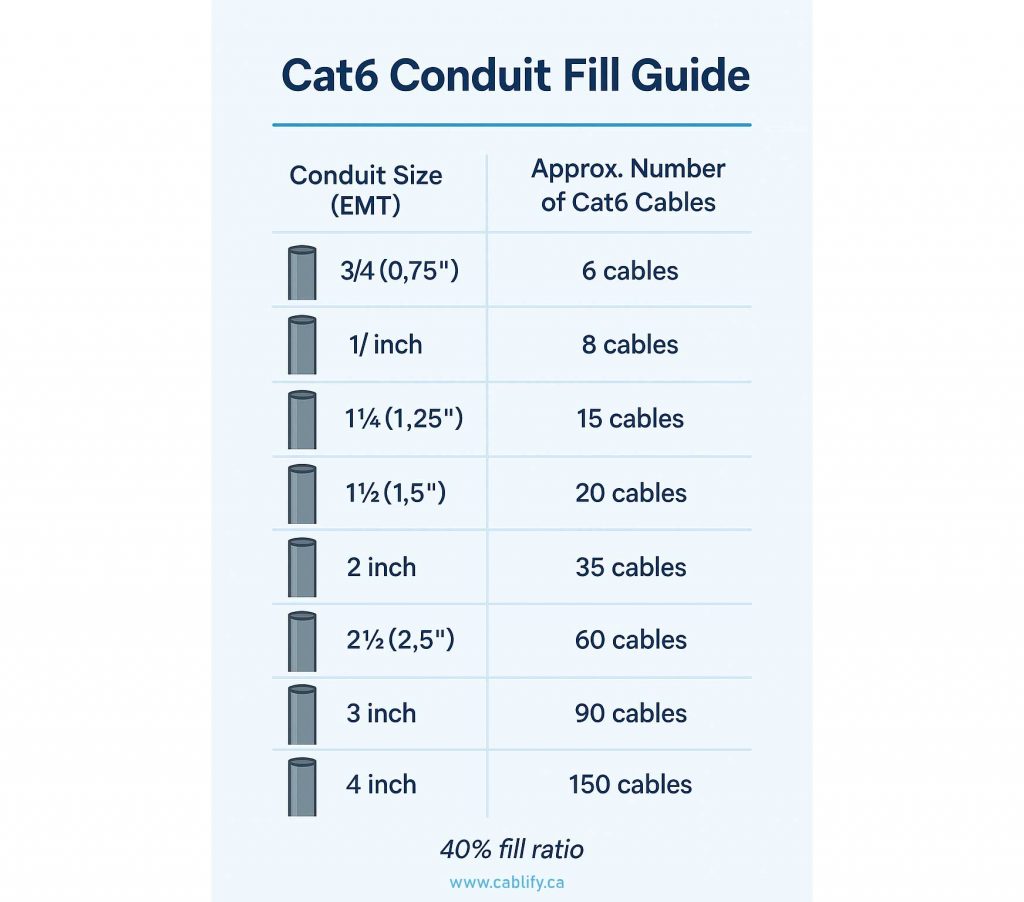
Credit: www.cablify.ca
Factors Affecting Cable Quantity
Determining how many Cat 6 cables fit in one conduit depends on several key factors. These factors ensure the cables perform well and last long. Ignoring them can cause problems like signal loss or damage to the cables. Understanding these points helps in planning cable installation properly.
Cable Bend Radius
Each Cat 6 cable has a minimum bend radius. This radius is the smallest curve the cable can handle without damage. Tight bends can break the internal wires or reduce signal quality. Maintaining the correct bend radius means fewer cables can fit in a conduit. It also ensures cables stay safe and work well.
Heat Dissipation Considerations
Cables generate heat during use. When many cables are packed tightly, heat builds up. Poor heat dissipation can degrade cable performance and shorten lifespan. Allowing space for airflow reduces heat risks. This need limits the number of cables in one conduit. Proper spacing keeps cables cooler and more reliable.
Future Expansion Needs
Planning for future growth avoids costly upgrades. Installing extra cables now saves time later. Leaving room in the conduit allows adding cables easily. This approach means fewer cables are placed initially. It balances current needs with potential future demands.
Installation Best Practices
Proper installation of Cat 6 cables in a conduit ensures strong network performance. Following best practices prevents damage and signal loss. It also makes future maintenance easier. Below are key tips to install cables correctly and safely.
Cable Pulling Techniques
Pull cables gently to avoid stretching or breaking them. Use a cable lubricant to reduce friction inside the conduit. Pull cables in a straight line without sharp bends. Avoid pulling too many cables at once. Use a fish tape or a cable puller for smoother installation.
Avoiding Signal Interference
Keep Cat 6 cables away from power lines and fluorescent lights. Use separate conduits for power and data cables. Avoid running cables near motors or other electrical devices. Maintain proper spacing between cables inside the conduit. Shielded cables can help reduce interference in noisy environments.
Labeling And Organization
Label both ends of each cable clearly for easy identification. Use durable tags or printed labels to avoid fading. Organize cables in bundles and secure with Velcro straps. Keep a record of cable locations and connections. Proper labeling saves time during troubleshooting and upgrades.
Tools And Accessories
Installing Cat 6 cables inside a conduit requires the right tools and accessories. These help protect cables and make the job easier. Using proper tools ensures cables do not get damaged and fit well inside the conduit. This section covers key items like cable lubricants and conduit pulling tools.
Cable Lubricants
Cable lubricants reduce friction between the cable and conduit walls. This makes pulling the cable smoother and faster. Lubricants help prevent cable jackets from tearing or stretching. They also reduce the effort needed to pull multiple Cat 6 cables through tight spaces. Choose a lubricant that is safe for Cat 6 cable materials. Apply it evenly on the cable before pulling it through the conduit.
Conduit Pulling Tools
Conduit pulling tools help guide cables through the conduit without damage. These include cable pullers, fish tapes, and pulling grips. Fish tapes allow you to lead cables through bends and long conduit runs. Pulling grips securely hold the cable end to prevent slippage. Using these tools reduces strain on the cables and installers. They improve efficiency and protect cable integrity during installation.
Troubleshooting Common Issues
Troubleshooting common issues in Cat 6 cable installation helps maintain network speed and reliability. Problems often arise from overcrowded conduits or damaged cables. Identifying and solving these issues early prevents costly repairs and downtime.
Identifying Overcrowded Conduits
Overcrowded conduits cause cable damage and signal loss. Check for cables that are hard to pull or bend sharply. Too many cables increase heat and reduce airflow inside the conduit. This can lead to slow network speeds and frequent disconnections. Use cable fill charts to know the maximum number of cables allowed. Ensure enough space to avoid pressure on cables during installation.
Dealing With Damaged Cables
Damaged cables cause poor signal quality and connection failures. Look for cuts, kinks, or crushed sections on the cable. Damaged jackets expose the wires to moisture and interference. Replace any cable that shows visible damage. Avoid pulling cables too hard or bending them too tightly. Proper handling keeps cables intact and network stable.

Credit: www.truecable.com

Credit: diy.stackexchange.com
Frequently Asked Questions
How Many Cat 6 Cables Fit In A 1-inch Conduit?
About 7 to 9 Cat 6 cables can fit comfortably in a 1-inch conduit.
What Affects The Number Of Cat 6 Cables In A Conduit?
Cable size, conduit type, and fill capacity limits affect how many cables fit.
Can Too Many Cat 6 Cables In One Conduit Cause Issues?
Yes, overcrowding can cause heat buildup and reduce cable performance.
What Is The Maximum Fill Percentage For Conduit With Cat 6 Cables?
Typically, conduit should be filled to no more than 40% for easy cable pulling.
Does Cable Insulation Thickness Impact Conduit Capacity?
Thicker insulation means fewer cables fit inside the same conduit size.
How To Safely Install Multiple Cat 6 Cables In One Conduit?
Use proper conduit size, avoid overfilling, and follow local electrical codes.
Conclusion
Choosing the right number of Cat 6 cables in one conduit matters. It keeps your network safe and working well. Too many cables cause heat and signal loss. Too few cables waste space and money. Follow cable size and conduit rules carefully.
Plan your setup to avoid problems later. This helps your internet run fast and steady. Remember, good wiring makes a big difference. Simple steps lead to a strong network system.
As an Amazon Associate, I earn from qualifying purchases.