Are you curious about how fast a Cat 8 Ethernet cable can really make your internet? If you want lightning-quick connections for gaming, streaming, or work, understanding the speed of Cat 8 cables is key.
This cable promises some of the fastest data transfers available, but what does that mean for you in real life? Keep reading, and you’ll discover exactly how Cat 8 can boost your network and whether it’s the right choice for your setup.
Don’t miss out on unlocking your internet’s full potential!
Cat 8 Cable Speed
Cat 8 Ethernet cable offers very high speed for data transfer. It is designed for fast networks and heavy data use. This cable supports much faster speeds than older cables. It is a good choice for places needing quick and reliable connections. Let’s explore the speed details of Cat 8 cables.
Maximum Data Rate
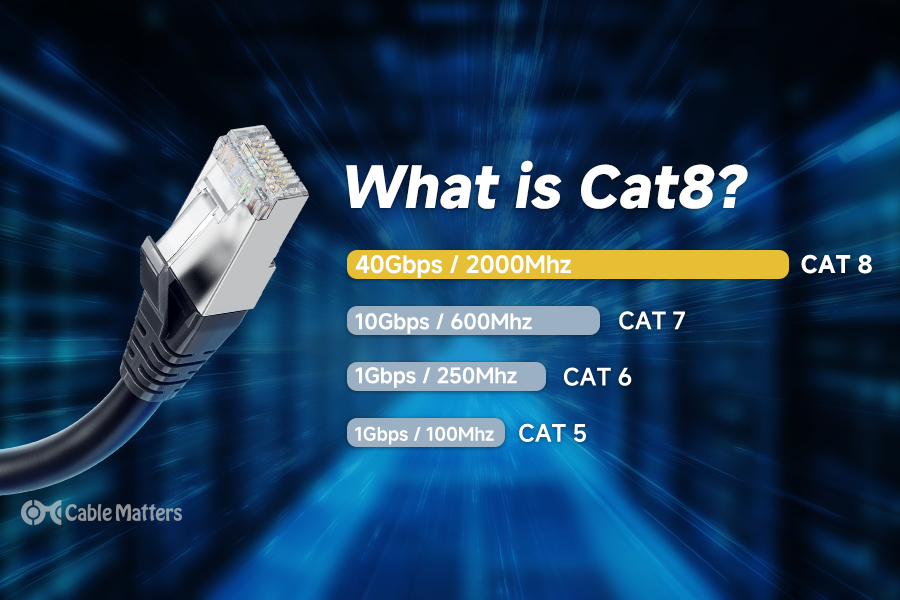
Cat 8 cable supports speeds up to 40 Gbps. This speed is much higher than most other Ethernet cables. It can handle large files and streaming without delay. The fast data rate helps improve network performance. This makes Cat 8 suitable for data centers and high-speed internet.
Frequency Range
Cat 8 operates at a frequency up to 2000 MHz. This is four times higher than Cat 6A cables. The high frequency allows more data to travel at once. It reduces interference and improves signal quality. High frequency is key for faster and stable connections.
Comparison With Previous Categories
Older cables like Cat 5e and Cat 6 support lower speeds and frequencies. Cat 5e offers up to 1 Gbps, and Cat 6 up to 10 Gbps. Cat 8 is much faster, reaching 40 Gbps. It also works over shorter distances but with better performance. This makes Cat 8 ideal for future-proof networks.
Credit: www.dedicatedaudio.com
Performance Factors
Cat 8 Ethernet cables offer very high speeds, but their performance depends on several factors. These factors can affect speed, reliability, and overall connection quality. Understanding these helps in choosing and using the cable correctly.
Cable Length Limitations
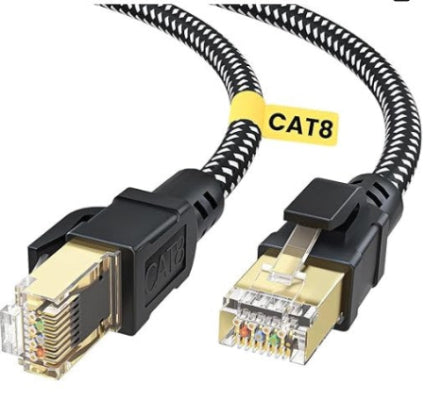
Cat 8 cables support speeds up to 40 Gbps, but only over short distances. The maximum recommended length is 30 meters. Longer cables can cause signal loss and slower speeds. Keeping cable runs short ensures the best performance.
Shielding And Interference
Cat 8 cables have strong shielding to reduce interference. Shielding blocks outside noise from other electronics and cables. Less interference means a cleaner, faster signal. Good shielding is important in busy or noisy environments.
Connector Quality
Connectors join cables to devices. High-quality connectors fit tightly and maintain good contact. Poor connectors can cause signal drops and slow speeds. Using certified Cat 8 connectors preserves cable performance.
Use Cases For Cat 8
Cat 8 Ethernet cables offer very high speeds and low latency. These features make them perfect for specific uses. They handle large amounts of data fast and keep connections stable. The cable’s power suits places where speed and reliability matter most.
Data Centers
Data centers need fast cables to move huge data quickly. Cat 8 cables support speeds up to 40 Gbps. They reduce delays and keep servers connected without interruptions. This cable helps data centers run smoothly and handle many tasks at once.
High-speed Gaming
Gamers want fast and steady connections. Cat 8 cables lower lag and improve response times. This means smoother gameplay and better control. Serious gamers benefit from using Cat 8 for their setups.
Streaming And Media
Streaming high-quality videos needs strong internet. Cat 8 cables handle large files without slowing down. They keep streams clear and stop buffering. Media creators and viewers both get better results with this cable.

Credit: www.amazon.com
Installation Tips
Installing a Cat 8 Ethernet cable needs care to get the best speed and performance. Small mistakes can slow down your network or cause connection problems. Follow these tips to install your cable correctly. This helps keep your internet fast and stable.
Proper Handling
Handle the Cat 8 cable gently. Avoid bending it sharply or twisting it. These actions can damage the wires inside. Keep the cable straight or with wide curves. Do not pull hard when connecting or moving it. Proper care keeps the cable working well for a long time.
Compatibility With Devices
Check if your devices support Cat 8 cables. Older routers or switches may not work at full speed. Use devices that handle high-speed connections. This ensures you use the cable’s full potential. Using the right hardware avoids slow speeds and connection issues.
Testing Cable Speed
After installation, test the cable speed. Use network speed test tools on your computer or router. This confirms the cable runs at Cat 8 speeds. Testing helps find problems early. Fix any issues to keep your network fast and reliable.
Cost And Availability
Cat 8 Ethernet cables offer the fastest speeds available today. Their cost and availability affect many buyers. Knowing these details helps you decide if Cat 8 fits your needs and budget.
Price Comparison
Cat 8 cables cost more than Cat 6 or Cat 7 cables. Prices vary based on length and brand. Short cables can start around $30. Longer cables may go over $100. The high speed and shielding add to the price.
Where To Buy
Cat 8 cables are available online and in stores. Major online retailers stock many brands. Electronics shops may carry them too. Always check for genuine products. Read reviews to avoid poor quality cables.
Value For Money
Cat 8 cables suit users needing top speeds. They work well for data centers and fast networks. For home use, cheaper cables might suffice. Investing in Cat 8 pays off if speed matters most. Otherwise, lower category cables save money.
Credit: www.cablematters.com
Frequently Asked Questions
What Is The Speed Limit Of Cat 8 Ethernet Cable?
Cat 8 Ethernet cables support speeds up to 40 Gbps over short distances.
How Far Can Cat 8 Cable Maintain 40 Gbps Speed?
It can maintain 40 Gbps speeds up to 30 meters (about 100 feet).
Can Cat 8 Cable Work With Older Ethernet Devices?
Yes, Cat 8 cables are backward compatible with older Ethernet standards.
Is Cat 8 Cable Faster Than Cat 7 And Cat 6?
Yes, Cat 8 is significantly faster than Cat 7 and Cat 6 cables.
Does Cat 8 Cable Reduce Internet Lag Or Delay?
Cat 8 cable offers lower latency, which helps reduce lag and delay.
What Types Of Setups Benefit Most From Cat 8 Cables?
High-speed data centers and gaming setups benefit most from Cat 8 cables.
Conclusion
Cat 8 Ethernet cables deliver very fast internet speeds up to 40 Gbps. They work best for short distances and high-performance needs. Using Cat 8 can improve your network’s speed and reduce lag. It fits well in data centers and gaming setups.
Remember, cable quality matters for consistent speed. Choose Cat 8 if you want top-speed connections today.
As an Amazon Associate, I earn from qualifying purchases.